
When Your Task's Priority Is Not What You Expect It To Be
A real-world FreeRTOS troubleshooting story
Gabor
2/17/20263 min read
Many experienced FreeRTOS users may already see the issue forming — especially given the title of this post.
Let’s break it down.
What Was Happening
my_app_mutex protects shared resources between:
A low-priority ADC processing user task
Another user task dealing with communication related to ADC data
Both tasks correctly lock and unlock this mutex during their execution cycles.
The ADC driver’s adc_api_get() internally acquires its own mutex.
That internal mutex is also used by the driver’s high-priority internal task (let’s call it adc_high_prio_task).
Here’s the critical sequence:
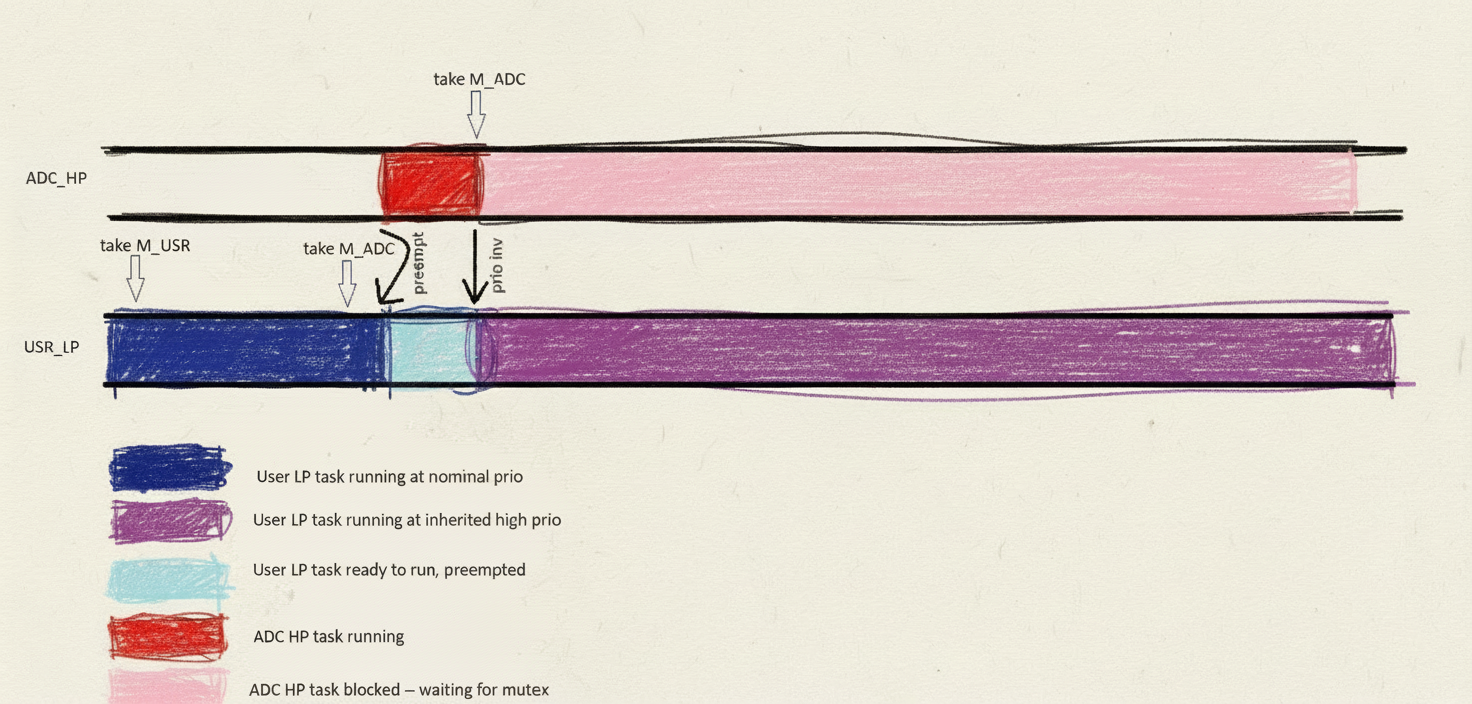
my_low_prio_adc_proc_task locks my_app_mutex
It calls adc_api_get()
adc_api_get() locks the driver’s internal mutex
adc_high_prio_task preempts the user task and attempts to lock that same internal mutex
At this point, priority inheritance kicks in. FreeRTOS temporarily raises my_low_prio_adc_proc_task to the priority of adc_high_prio_task.
So far, this is correct behavior.
Why This Became a Problem
Under normal circumstances, once adc_api_get() releases the internal mutex, everything should return to normal.
But here’s the key detail:
FreeRTOS implements a simplified priority inheritance mechanism.
A task’s priority is restored only after it releases all mutexes it holds.
In this case:
The internal driver mutex is released
But my_app_mutex is still held
And the task enters a polling loop
while ( !MY_TRIGGER_COND )
{
my_check_some_flags();
}
The application assumes the task is low priority so it can safely wait there. But that assumption is no longer true.
Because it still holds a mutex, its elevated priority remains active.
Due to additional design details in the application, the flags the task was polling never changed — turning this into a permanent deadlock-like condition.
This made the ADC driver stop while the system stayed alive.
A simple sketch of how things happened in time:
This is the first post in a series where we share real-life cases from our engineering practice. Each post will walk through an interesting problem, how we approached it, and what we learned. We hope you’ll find them both insightful and instructive.
This story describes an issue reported by a client that required a rapid and effective resolution.
The Client’s System
Running FreeRTOS in a fairly standard configuration
Multiple integrated software stacks (communication, ADC processing, power management, storage, etc.)
Application layer uses these stacks exclusively through well-defined, thread-safe APIs
The architecture was clean. The APIs were respected. Everything looked reasonable on the surface.
The Issue
The client reported a problem that appeared under heavy ADC processing load.
Symptom: ADC processing stops entirely
Recovery: Only a power cycle restores functionality
The system remained alive -- but ADC data was missing.
Troubleshooting Capabilities
We were in a relatively strong position:
The issue was reproducible — though it might take hours or even days
The exact triggering usage pattern was unknown
Full documentation of the software stacks was available
User application code was available (not always the case)
Complete project and hardware were available (even rarer)
Communication logs could be requested -- could have been useful as ADC activity was related to comms
A high-load communication and ADC test could be set up within an hour
This combination is something every embedded engineer appreciates.
The Approach
Given that reproduction could take a long time — but setting up a stress test was easy — we started a continuous high-load test on real hardware using the client’s exact project.
While the test was running, we began a structured code review:
Big-picture architecture
User application code, especially how the ADC processing API was used
Stack integration details
Any additional design patterns or suspicious constructs
Running the test in parallel with the review gave us both confidence and time efficiency.
The Discovery
In this case, the root cause was identified relatively quickly during the review of the user application code.
Here is a simplified version of the relevant task
MY_TASK my_low_prio_adc_proc_task ( void )
{
MY_FOREVER
{
my_wait_event();
my_take_mutex( my_app_mutex );
/* ... */
/* Call the ADC API to check if we have new incoming data */
adc_api_get();
/* ... */
while ( !MY_TRIGGER_COND )
{
/* Just hang around here until something happens somewhere else */
my_check_some_flags();
}
my_release_mutex( my_app_mutex );
}
}
If you’ve encountered similar priority inheritance surprises in FreeRTOS, we’d be curious to hear your experience.
Verification
While the code review strongly indicated this as the root cause, the long-running stress test eventually reproduced the issue — confirming the theory.
Multiple solutions were proposed, proper redesign ones as well as quick fixes -- the issue was later confirmed to be fixed using one of those.
Related Reading
After identifying the root cause, we revisited the relevant documentation and discussions regarding FreeRTOS’ simplified priority inheritance:
These explain the behavior clearly — but only if you know to look for it.
Lessons Learned
The right troubleshooting approach is essential.
Structured code review is extremely powerful.
Understanding what the code does is essential.
Having access to full application code and hardware dramatically improves diagnostic effectiveness.
Interestingly, had the infinite loop not been truly infinite, the symptoms might have been completely different:
Sluggish UI
Random delays
Lower-priority subsystems silently failing
Or the issue might have remained undiscovered for much longer
Access to full projects and application code is something we strongly advocate for — and why this matters will be the topic of a future post in this series.
Engineering & Support
Expert assistance for embedded projects.
Contact
© 2026. All rights reserved.
||